- What is vehicle parts compatibility?
- Why add fitment data to your listings?
- How buyers search for vehicle parts on eBay
- How to add fitment to your listings
- Using Manufacturer Part Number and brand
- Creating a single listing
- Creating or revising multiple listings
- Master vehicle list
- Master powersports vehicle list
- Frequently asked questions

On ebay.com, buyers purchase 3 auto parts and accessories every second. It means that thousands of items from this category are sold on the platform every day. To help all these transactions go smoothly, eBay has implemented the Parts Compatibility feature. Buyers can quickly find parts that fit their vehicle, while sellers get increased conversion rates and fewer return requests. As a result, sellers enjoy a better bottom line and higher performance.
What is vehicle parts compatibility?
When you create a Parts & Accessories listing, it’s recommended to add parts compatibility information (also known as "fitment"). This allows you to add the vehicle years, makes, models, trims, and engines that your part fits (up to 1,000 or 3,000 combinations, depending on the category), so buyers can find the right parts for their vehicle.
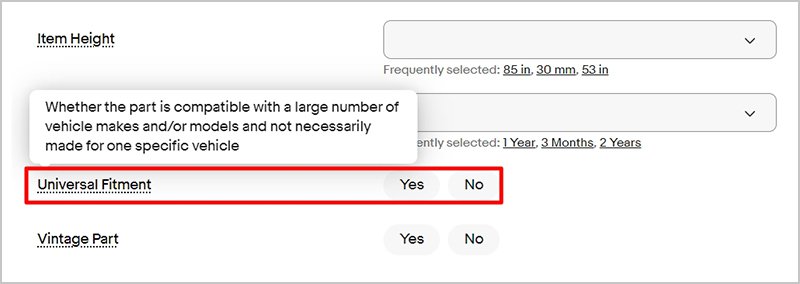
If your item is not vehicle-specific, such as sun shades or floor mats, select “yes” for the "universal fitment" item specific, under the "recommended" or "additional" sections of your listing.
Why add fitment data to your listings?
Fitment information helps buyers easily find the correct items for their vehicles.
- It increases your sales potential and visibility on eBay and search engine results.
- It better matches you with buyers searching for your items, and maps your listings to the vehicles buyers have saved in My Garage.
- It reduces the amount of returns and time spent managing buyer queries and complaints.
- It helps you avoid extra fees charged for duplicate listings.
- It saves your time because in most cases the fitment information can be added automatically.
There are approximately 110 million live parts listings on ebay.com
Every second, 3 parts or accessories are sold on ebay.com
Every 11 seconds, 1 vintage car or truck part is sold on ebay.com
How buyers search for vehicle parts on eBay
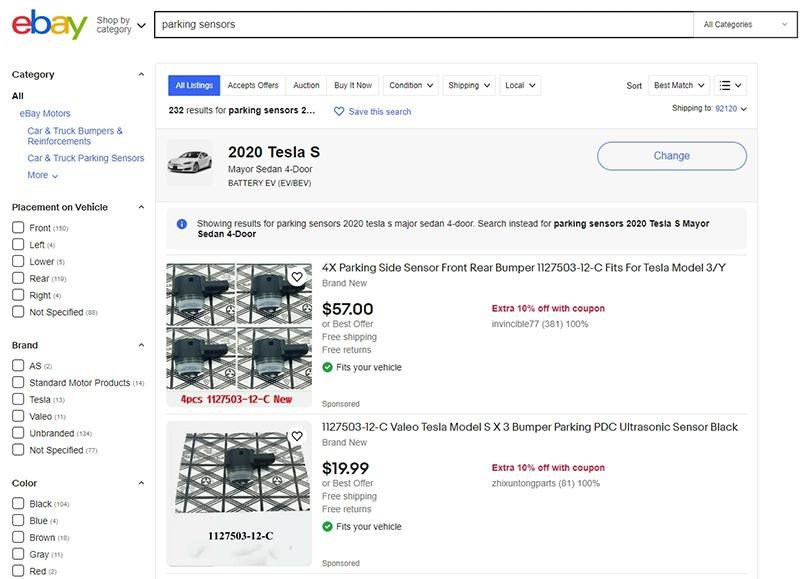
When searching for vehicle parts and accessories on eBay, buyers use the parts finder to ensure the products fit their vehicle. This filters the search results to show only relevant products.
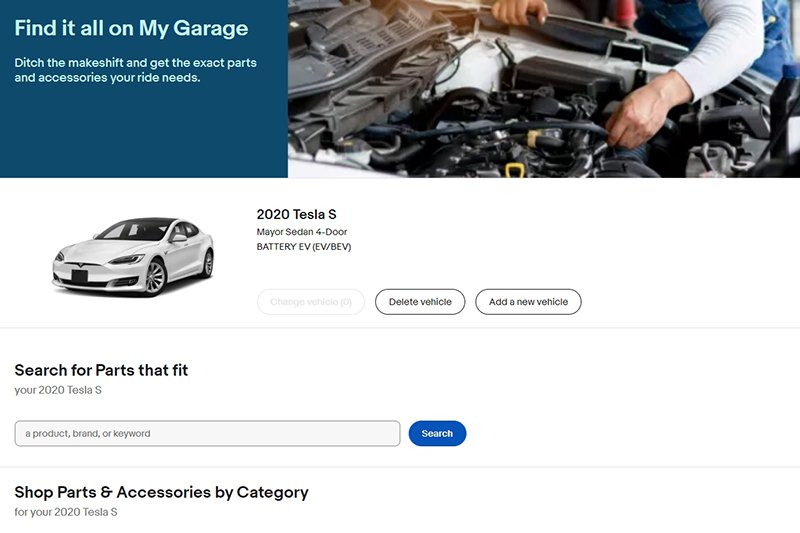
When buyers use the parts finder, their vehicle is saved to My Garage, so they can filter any P&A search to only show products relevant to their vehicle in future.

How to add fitment to your listings
- Choose your category. Parts compatibility is available on eBay Motors in most of the following categories:
- Car & Truck Parts & Accessories
- Vintage Car & Truck Parts & Accessories
- Powersports Vehicle Parts & Accessories (Motorcycles, ATVs, etc.)
- Vintage Motorcycle Parts
Currently excluded categories:
- Car & Truck Parts – Decals, Emblems & License Frames
- Vintage Car & Truck Parts – Decals, Emblems & Detailing
- Automotive Tools & Supplies
- Apparel & Merchandise
- Car Electronics
- Commercial Truck Parts
- Gather all information about the part or accessory, including the brand, Manufacturer Part Number (MPN), make, model and variant, to ensure buyers can find products that are compatible with their vehicles. You can use the master vehicle list (MVL) to compare your item information with the eBay data to create your listing.
- Decide how you’re going to list your product. You can list your products one at a time or in bulk using eBay tools or third-party tools.
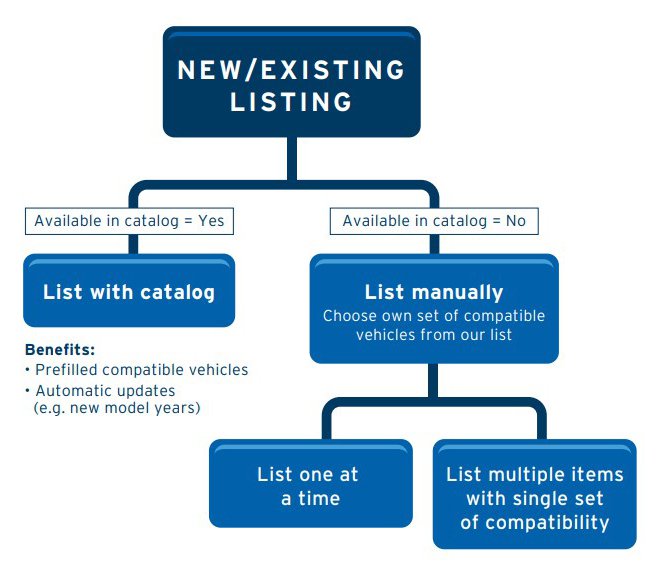
- Edit an existing listing or create a new listing with parts compatibility. Use our catalog, if available, or include compatible vehicles manually. If you list with the catalog, you get prefilled compatible vehicles and automatic updates (e.g. new model years). If you choose to list manually, you can either list one item at a time or list multiple items with a single set of compatibility.
- Confirm your compatible vehicles in the compatibility section of your new listing and replace your previous listing with a parts compatibility listing. Your listing will show up when buyers search these terms.
- Finish listing as usual.
Using Manufacturer Part Number and brand
Some buyers prefer to buy only from a certain manufacturer because of a reputation or because that manufacturer specializes in parts for a certain make of car.
Including the correct Manufacturer Part Number (MPN) and brand in your listing helps match your product with valid k-type or vehicle data. Listings that include this information enjoy a conversion boost because buyers feel more confident about the purchase.

MPNs and other product identifiers are essentially unique codes that work like barcodes and can be used to identify a specific product. To learn more about product identifiers, please read the article Tools and solutions for selling vehicle parts on eBay.

Creating a single listing
Step 1
Create a listing as you would for any other item: go to the Listings tab of Seller Hub or click the Create Your Listing button in the top right corner of any export.ebay.com page. Enter the name or the MPN of your item in the Tell us what you’re selling field to see the suggested products from the marketplace’s catalog.

Step 2
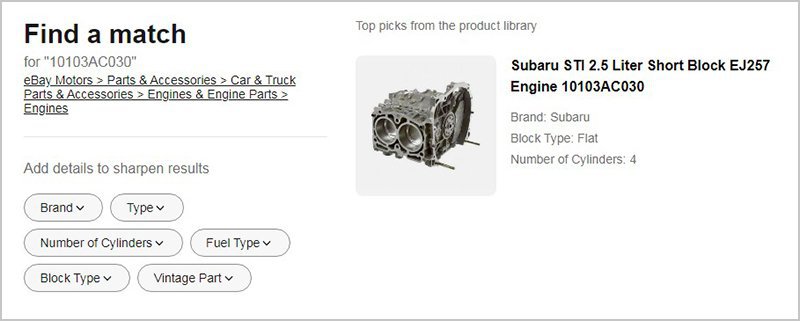
eBay will suggest products that are already in the catalog. If your item is among them, click it to use the catalog information in your listing, and it will be pre-filled automatically. If your item isn’t in the catalog, click the Continue without match button.
Step 3
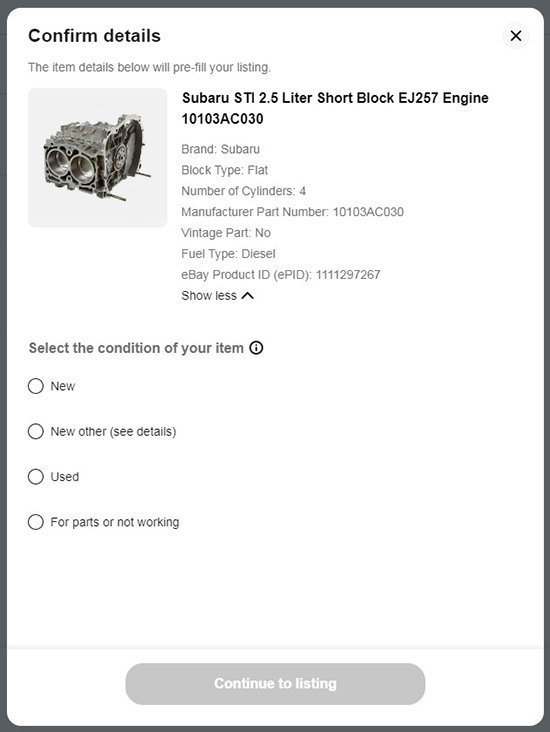
Pick the catalog product that matches your item, check if the information is correct, select the condition and proceed to the Sell Your Item form.
Step 4
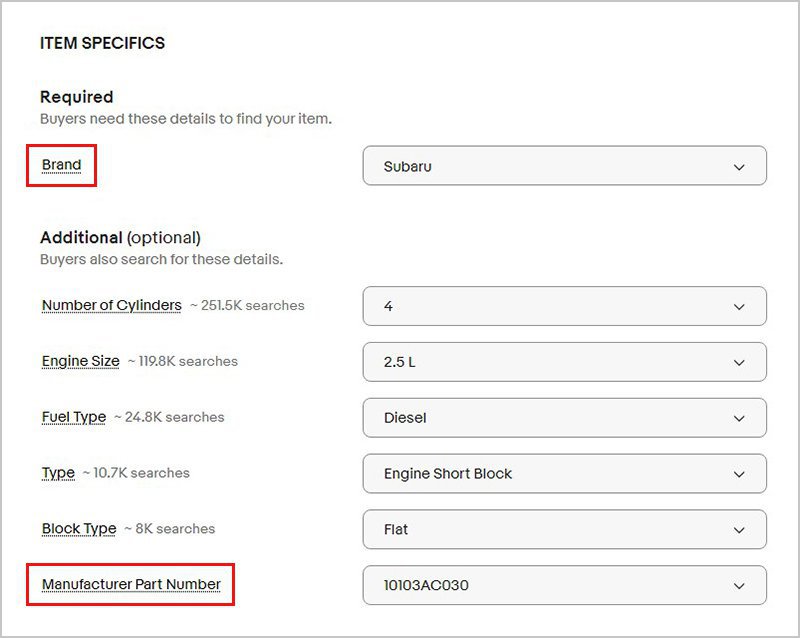
After you’ve entered detail about what you’re selling and chosen the right category, be sure to include the brand and MPN (Manufacturer Part Number).
Step 5
Next, click Edit in the Compatibility section to add compatible vehicles for your item. At a minimum, include Make, Model and Year.

Buyers are searching for parts to fit their particular vehicles, so it’s important to be accurate when adding compatible vehicles, to avoid returns.
You can add up to 3,000 vehicles that your part is compatible with. Use the master vehicle list (MVL) with Seller Hub Reports Tool to add parts compatibility data to your listings in bulk.
When you’re updating a listing, make sure to add as many "recommended" item specifics as you can. These are based on frequently searched terms and help buyers find your listings and understand exactly what you’re selling.
Step 6
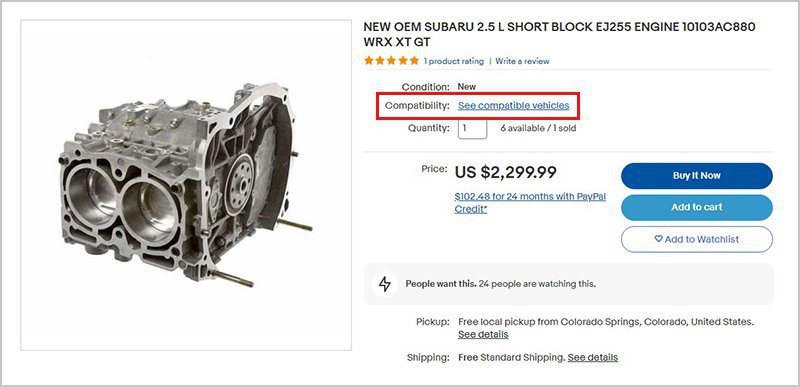
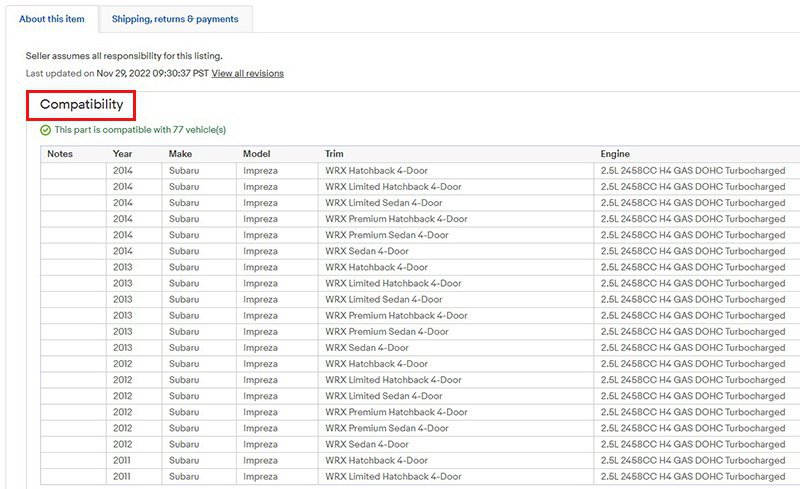
Review the listing and finish it as usual. Buyers will see the fitment information in the About this item section.
If you need more information about how to create a listing, please read the step-by-step guide.
Creating or revising multiple listings

If you sell in the Auto Parts & Accessories category, you have the option to adopt eBay’s parts catalog. There are multiple benefits of adopting it, including:
- A faster and simpler listing process
- Increased traffic to listings and potentially higher conversion
- Improved visibility in search
- Rich features like product reviews
- Help potential buyers find the exact product fit for their needs
The catalog allows sellers in most Auto Parts & Accessories categories to quickly list items using brand, MPN or GTIN (UPC, ISBN, EAN), and add valuable details such as images, item specifics and parts compatibility.

Using Seller Hub Reports
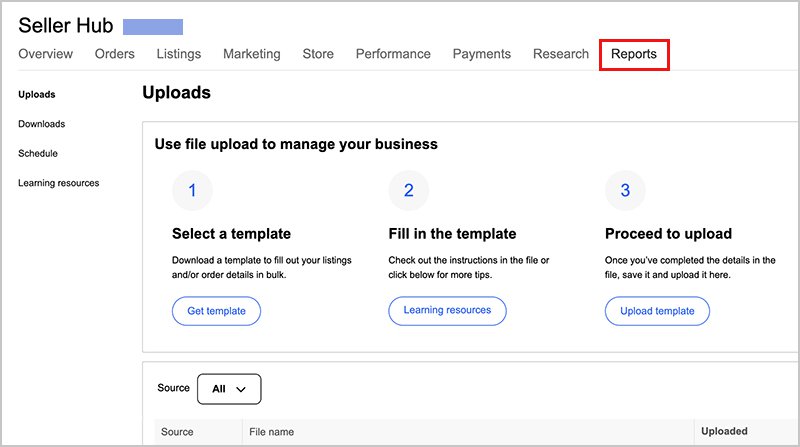
Seller Hub Reports, formerly known as eBay File Exchange, lets you upload and manage your inventory easily and efficiently in CSV or tab-delimited files.
You can use Seller Hub Reports to create and revise new listings in bulk. Follow the format of the downloadable template to complete the relevant information for up to 5 categories at a time. Add data into the "Relationship" and "Relationship Details" columns.
If you use a third-party inventory application and need to upload the information to eBay, this tool is for you. Learn more about how to use Seller Hub Reports.
Master vehicle list (MVL)
The Master Vehicle List (MVL) provides the information that powers the parts compatibility feature. Use it to compare the information you have about your item with the data used by eBay to create your listing.
Even if you don’t match your listings to our catalog, it’s still important to manually add compatibility information to your listings to boost your visibility in search, and avoid duplicate listings. You can manually choose up to 3,000 compatible vehicles per listing from the MVL. It’s also possible to use it with Seller Hub Reports to add parts compatibility data to your listings in bulk.
If there’s a vehicle that you believe is missing from the MVL, please send an email with the title “MVL Missing Vehicle Request” to sdsupport@ebay.com. Make sure you provide the Make, Model, Year and Output (KW and HP, if known) so eBay can accurately validate your request.

Master powersports vehicle list (MPSOV)
If you have listings in such categories as motorcycle parts, ATV parts, etc., use the master powersports vehicle list so buyers can refine their search by model to find your items.
To request the addition of vehicles that you believe may be missing from the list, please send an email with the title “MPSOV Missing Vehicle Request” to sdsupport@ebay.com.

Frequently asked questions
What is fitment (parts compatibility)?
Fitment is information about the parts being listed that identify which vehicle the part fits. Fitment is a better way for sellers to list parts that fit a variety of vehicles. It’s also a great way for buyers to find parts that fit their vehicles. With new fitment listings, you can create one listing describing a single part and add a complete list of compatible vehicles. This eliminates the need to list one part multiple times to ensure all compatible vehicles are found in search.
Why should I use fitment listings?
Using fitment, you can include a detailed list of compatible vehicles for a single part right in one listing, reducing the number of listings you need to create. Compatibility information appears on the item page and is searchable. Your fitment listings get a boost in Best Match search, and you can use your 80-character title for popular search elements like brand or part number to better market your listing.
Why is eBay Motors making this change?
The eBay Motors team developed the fitment feature to help you run your business more smoothly by simplifying listing creation and management and reducing repetitive listing. Buyers will be able to find parts faster and with more confidence that the part will fit, resulting in fewer returns and inquiries. Plus, fewer listings mean you pay less in fees.
Do I have to use fitment in my listing?
No, using fitment is currently optional. However, listings that display compatible vehicle data created with the new feature will help get your relevant items in front of buyers via search and helps to avoid using multiple listings for the same item, a violation of eBay’s Duplicate Listing Policy.
How does the listing process work?
There are two ways to list with fitment:
- Search for your product in eBay's parts catalog while you are listing your item. A complete list of vehicles your part fits will appear in your listing.
- If you do not find a match for your product in our catalog, fill in the necessary compatibility information for tires and wheels by specification; for all other parts by vehicle details.
Why is the listing flow different for some subcategories?
For parts with clearly defined specifications like tires and wheels, you’ll be asked to provide details about the part itself. For example, specifications for tires include width, aspect ratio, rim diameter, load index and speed rating.
For all other parts, you’ll be asked to provide details about the vehicle with which the part is compatible. These details include year, make, model, engine and trim.
How do I list using fitment?
Please view the "How to add fitment" section to select the right tool to list using fitment.
What are vehicle details?
Vehicle details include year, make, model, trim, and engine. These are the details you can enter in the manual process.
| Term | Definition | Example |
|---|---|---|
| Year | Year of manufacture | 2005 |
| Make | Auto assembler | Dodge |
| Model | - | Durango |
| Trim | Body + Submodel + # of doors | Limited Sport Utility 4-Door |
| Engine | Engine size (liters, cc, cid), Cylinder, Block Type, Fuel Type, and Cylinder Head Type | 4.7L 285Cu. In. V8 GAS SOHC Naturally Aspirated |
What if I don’t know, or want to provide, all the information about a compatible vehicle?
Even if you do not enter all the details (e.g., you provide year, make, model but not trim or engine), the list of compatible vehicles will still include compatible vehicles with the details you provide.
Example: A seller has a headlight that fits all 2002 Dodge Durango trucks. The seller chooses Year: 2002, Make: Dodge, and Model: Durango. The system recognizes that this 2002 Dodge Durango has multiple trims and engines. The system presents all compatible 2002 Dodge Durango trucks, with all trim and engine options, for inclusion in the vehicle compatibility list. Please note the system will return only information on vehicles using the details you provided (in this case 2002, Dodge, Durango).
What if my part is not in the eBay catalog?
If your part is not in the eBay catalog, and you know which vehicles it is compatible with, you can add them to your listing by providing the year, make and model of the compatible vehicles. It is optional to specify trim and engine information.
What if I disagree or am not sure if the compatible vehicles for my part are correct?
If you are unsure that the information returned to you when you input your part type, manufacturer or number is accurate, use the manual process to input the vehicles you are sure fit the part you're selling.
Should I repeat the compatibility information in my title or description?
There is no need to repeat compatibility information in your listing title. Instead, use your title for popular search elements like brand, part type, MPN part number, equivalent OEM part number, part name, material, and any other part numbers (e.g., Platinum number). Some examples:
Old title: Ford Ranger 88/07 Short Bed New Tonneau Bed Cover 6ft.
New title: Freedom 9630 Black Tonneau Bed Cover 6 ft
Old title: 192-1994 1995 Honda Civic EG6 Headlights + Vision
New title: JDM Blk Crystal Headlights w/Vision Amber Corner Lights
You can repeat compatibility information in your listing description, but this is not essential since this information will already be displayed on the compatibility tab and is used in search. Compatibility information in the description may not be surfaced in search.
Can I transfer compatible vehicle info from an existing listing into a new one?
Yes, you can use information from your existing listing in a new listing with fitment by using the “sell similar” or “relist” options in the Sell Your Item form. Be sure to create a new title using popular search elements like brand and part number with your new fitment listing. Please be certain the information you transfer to your new listing is correct since you are responsible for presenting accurate information about compatible vehicles.
Can I use the fitment feature with a third-party service?
Check with your third-party service provider to see if fitment is available.
Can I use bulk relist features to modify large numbers of listings at a time?
Please use the Myfitment or Frooition tools for Bulk Update of Fitments.
What are the item-specifics required to add fitment in tires (66471) and wheels (43953) categories?
Tires:
- Section Width
- Aspect Ratio
- Rim Diameter
- Load Index
- Speed Index
How can I optimize my parts compatibility listings?
It’s important to keep your listings simple and organized, so that your listings stand out to buyers.
Follow these best listing practices to most efficiently create your parts compatibility listings and to provide an optimized experience for buyers, which will help you drive sales. The results from following these guidelines will ultimately make for happy buyers and happy sellers!
- Use our catalog by choosing from over 11 million products when creating your listing. This method will automatically populate your listing with compatible vehicles and will update car year, make and model information when new vehicles are released.
- Add your own list of compatible vehicles if your product isn’t in the catalog. You can manually include your own list of up to 3,000 compatible models. Create one listing per product and add all compatible vehicles to that listing.
- If the Manufacturer Part Number fits more than 3,000 vehicles, you can list multiple items of that MPN. Fitment does need to max out at 3,000 before moving to a new listing. A seller can have up to 5 listings in these situations.
- Use your 80 character title wisely by focusing on search elements like brand names, part numbers and product features. Including compatible vehicle information in your title will not increase your exposure in buyer searches.
- Choose a listing tool that supports parts compatibility. The built-in eBay tools support compatibility and so do numerous third party providers. Check the compatibility page to find out which tools can help you get started!
How are the compatible vehicles displayed in my listing?
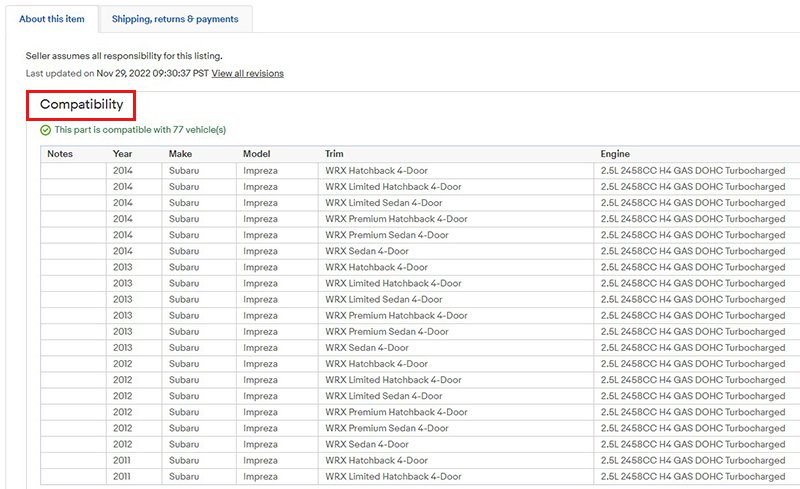
For parts, tires and wheels, the compatible vehicles are listed in a "Compatibility" section in the item description just below the "Item Specifics" section. The buyer will see a list of all vehicles compatible with your part.
Will I get better search visibility if I use parts compatibility?
Consolidating your listings using the parts compatibility feature may help your Best Match listing performance score (your listing's sales in relation to the number of times a buyer sees it).
If I use parts compatibility, how do buyers find my item?
Most buyers search for parts by entering the part description and information about their vehicle. With parts compatibility, your listing will appear each time a buyer searches for relevant parts by describing the vehicle, not just when the title matches the individual keywords.
With parts compatibility, search will return listings using the vehicles in the compatibility section of your listing and the keywords in your title. This means you can use your title for popular search elements such as brand or part number to better market your listings.
In what categories can I list with parts compatibility?
Check your onsite inventory for eligibility. Parts compatibility is available on eBay Motors in most of the following categories:
- Car & Truck Parts & Accessories
- Vintage Car & Truck Parts & Accessories
- Powersports Vehicle Parts & Accessories (Motorcycles, ATVs, etc.)
- Vintage Motorcycle Parts
The following categories (category numbers in parentheses) are currently excluded:
- Car & Truck Parts – Decals, Emblems & License Frames
- Vintage Car & Truck Parts – Decals, Emblems & Detailing
- Automotive Tools & Supplies
- Apparel & Merchandise
- Car Electronics
- Commercial Truck Parts