





Choosing your listing format
When it comes to pricing your item, you first need to choose how you want to sell it. You can create an auction-style listing or a fixed price listing.
Auction listings
You choose a starting price, and interested buyers place bids. When the auction ends, you sell to the highest bidder.
Auctions are most commonly used for rare, limited edition or high profile, high demand items. Be sure to start the auction at a minimum price you are willing to accept and buyers can bid upwards from there.
Fixed price listings
There is no bidding — buyers can use only the Buy It Now price to purchase your item. However you can also choose to add a Buy It Now option to your auction listings.
The Buy It Now option
is the simplest way to price an item on eBay and much more commonly used. Fixed-price listings are set to Good ’Til Canceled duration by default. This means the listing will be auto-renewed every 30 days until you end it or until the item sells.
Pricing in an auction-style listing
Pricing when using a fixed price or a Buy It Now listing
Pricing tips
If you're not sure how much you should charge, or aren't sure of your item's value, you can find similar listings and decide on a price.
eBay's search function
In the search bar, enter the keywords that best describe your item.

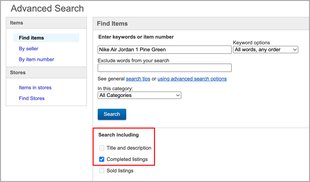
You can also see how much items like yours have sold for in the past by checking out completed listings. Here's how:
- Go to Advanced Search.
- Enter keywords that describe your item.
- Choose Completed listings and select Search.
Product Research
This tool provides powerful pricing guidance for your items. It is available for free to all eBay sellers from the Research tab in Seller Hub. In addition, for many categories you will see pricing insights directly within the listing flow to ensure you have the information you need to price your items effectively.
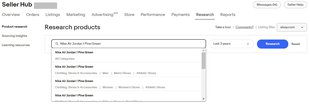
You can enter both keywords and UPC, EAN, ISBN codes and some other product identifiers into the search bar. Also you can choose the period for which the data will be shown.
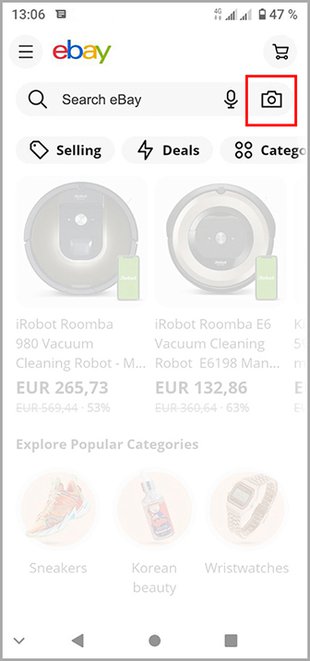
eBay app image search
In the eBay app, you can use the image search tool. Just click on the camera icon in the search bar, snap a photo with your phone or upload an image, and you’ll automatically see all current matching listings. You can also scan your item barcode to instantly find what you are looking for.
General web search
Finally, you can do the general web search to see how your item is priced outside of eBay.
Free shipping
According to the eBay internal statistics, more than 70% of eBay transactions ship for free, because customers prefer the simplicity of an all-inclusive price. To offer free shipping without harming your interests, factor the shipping cost into your final listing price. If you don’t offer free shipping, keep the shipping cost in mind when pricing your item, as customers may be less willing to pay a higher price if they also have to pay for shipping.
Frequently asked questions
I have a pair of sneakers for sale. What listing format should I choose?
How can I set the Buy It Now price for an auction-style listing?
What is a reserve price?
Does eBay have special tools that can help me set a competitive price?
Can I use Product research on international eBay sites?

You might also be interested in
How to revise a listing
Have you found a mistake in the description? Perhaps, you want to lower the price or offer free shipping. You can usually make changes to your active listings, but there are some restrictions depending on what you want to change and when.