





Feedback profile
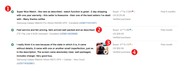
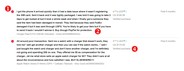
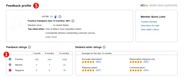
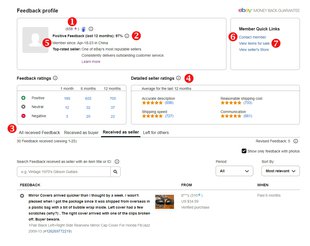
Each time you buy or sell something, you have an opportunity to leave feedback about your experience. Feedback consists of a positive, negative, or neutral rating (1), along with a short comment (2) and the option to upload up to 5 images (3). Feedback helps buyers and sellers build their reputation on eBay and this is why a "verified purchase" mark (4) is displayed next to feedback. This information is available in each member's feedback profile (5), and helps eBay users buy and sell with confidence.
Viewing a feedback profile
You can view a member’s feedback profile — including your own — by selecting the number in brackets next to their username. This number is their current feedback score.
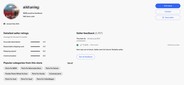
On the feedback profile page, you'll see a member’s:
- Overall feedback score (1)
- Percentage of positive ratings (2)
- Recently received feedback (including comments and images) (3)
- Detailed seller ratings (4)
- eBay registration date (5)
You can also find a link to contact the member (6), and if the member is a seller, a link to view other items they are selling (7).

Making your feedback public or private
eBay strongly encourages everyone to keep all their feedback information public.
If you are an eBay seller, your feedback must be visible to everyone. It helps you earn the trust of other eBay members, increasing the likelihood that they’ll trade with you.
If you choose to make your feedback private, you won’t be able to sell items on eBay and the feedback you’ve left and received will be hidden from other members. However, your overall number of positive, neutral, and negative feedback ratings will still be displayed.
Here’s how to change who can see your feedback:
- Go to your feedback profile.
- Scroll down to the All received Feedback section and set the toggle to either Visible to everyone or Hide.