




Feedback profile
Each time you buy or sell something, you have an opportunity to leave feedback about your experience.
The ratings buyers give you as a seller are then added to your overall feedback and your detailed seller rating scores.
Detailed seller rating is a breakdown of how buyers have rated that seller in the following areas:
- Item description – How accurately was it described?
- Communication – Did the seller communicate well with their buyer?
- Shipping time – How quickly did the seller ship the item?
- Shipping and handling charges – Were the costs reasonable?

To view your detailed seller ratings, select the number in brackets next to your username to go to your feedback profile. You'll find stars next to the 4 different areas, with 1 star being the lowest rating and 5 stars being the highest.
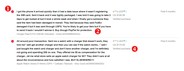
Feedback consists of a positive, negative, or neutral rating (1), along with a short comment (2) and the option to upload up to 5 images (3). Feedback helps buyers and sellers build their reputation on eBay and this is why a "verified purchase" mark (4) is displayed next to feedback. This information is available in each member's feedback profile (5), and helps eBay users buy and sell with confidence.



You can view a member’s feedback profile — including your own — by selecting the number in brackets next to their username. This number is their current feedback score.




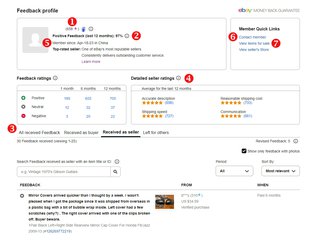
On the feedback profile page, you'll see a member’s:
- Overall feedback score (1)
- Percentage of positive ratings (2)
- Recently received feedback (including comments and images) (3)
- Detailed seller ratings (4)
- eBay registration date (5)
You can also find a link to contact the member (6), and if the member is a seller, a link to view other items they are selling (7).
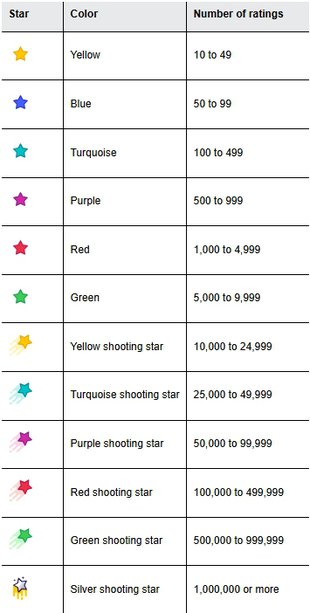
Once you reach a feedback score of 10, you’ll earn a yellow star which is displayed on your profile. As your feedback score increases, the star changes color, all the way to a silver shooting star for a score above 1,000,000.
Viewing and responding to feedback from buyers
There may be times when you want to reply to feedback a buyer has left for you, or add a comment to feedback you’ve previously left for someone else. You can’t change feedback you’ve left for a buyer, but you can ask a buyer to reconsider feedback they left for you.
How to respond to feedback
You can view all the feedback you’ve left or received in your feedback profile. From there you can also respond to feedback.
When you respond to feedback, your reply appears directly below the initial feedback comment.
Here’s how you can reply:
- From your feedback profile page, find the feedback you’d like to reply to.
- Select Reply from the Action column.
- Enter your reply, then select Send.
If you can’t find the feedback you want to reply to, you can use the search bar below the All Received Feedback tab to search by the buyer’s username, the item number, or the item title.
Search will only return feedback that was left in the last 12 months.
You can only reply once to a feedback comment, and you can’t edit or retract that reply.
How to send a feedback revision request to your buyer
While it doesn’t affect your seller performance, eBay understands that positive feedback is important to you. If you believe feedback you received from a buyer isn’t accurate or fair, you can try to resolve the situation by replying to the feedback or by requesting a feedback revision.
To try to resolve the issue, eBay recommends that you reply directly to the buyer’s feedback, or ask the buyer to revise their original rating and comment.
You can only request a revision for feedback that is less than 30 days old. You can make 5 feedback revision requests per calendar year.
For every 1,000 feedback ratings you receive during the year, you can make 5 additional feedback revision requests. However, these additional feedback revision requests don’t carry over into the following year.
What happens when you ask for a feedback revision?
When you send a feedback revision request to a buyer, eBay will send them an email with all the details.
The buyer then has 10 days to either:
- Revise the feedback: If the buyer accepts the request, eBay will guide them through the process of changing their rating and comment. When they revise feedback, their original comments will no longer be visible on eBay
- Decline the request: If the buyer declines the request, they can choose whether to share their reasoning with you
You can see the number of revised feedback on the feedback profile page.
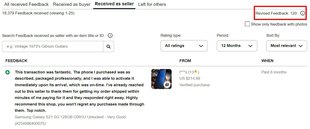
If the buyer hasn’t taken any action after 7 days, eBay will send a reminder. If the buyer still hasn’t responded after 10 days, the revision request will expire.
Please remember, negative and neutral feedback (NNFB) and Low Detailed Seller Ratings (“Low DSR”, Detailed Seller Rating score of 1, 2, or 3 for “Item as Described”) are two of the four key metrics used by eBay to evaluate the rate of transactions with bad buyer experience rate (BBE). The sellers whose BBE rate is much higher than the peer market average may be subject to a range of actions.
Learn more about bad buyer experience rate
Visit Seller Help to dispute any buyer feedback.
In some cases, eBay may remove or adjust feedback. You can learn more about this in eBay Seller performance and defect removal policy.
Can feedback be removed?
✅ Automatically removed
Based on the information it has, eBay automatically removes feedback in certain situations, including where it finds the buyer was at fault, if the problem was caused by an eBay site issue, or if there was an issue outside of your control like shipping service delays, or items being delayed because of an extreme weather event.
Automatic adjustments happen daily. You won’t need to contact eBay, but please allow up to 72 hours for changes to show in your feedback profile.
❌ Not eligible for removal
The following scenario isn't eligible for removal:
- eBay may remove a feedback comment that violates eBay policy, such as containing profanity or links, but the feedback rating or any defects aren't necessarily removed
⚠️ Manual review
There are some circumstances where feedback can be manually reviewed. Sellers may appeal in these cases, but must make the request within 90 days of the transaction.
Making your feedback public or private
eBay strongly encourages everyone to keep all their feedback information public:
If you are an eBay seller, your feedback must be visible to everyone. It helps you earn the trust of other eBay members, increasing the likelihood that they’ll trade with you.
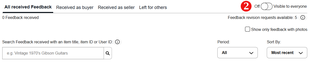
If you choose to make your feedback private, you won’t be able to sell items on eBay and the feedback you’ve left and received will be hidden from other members. However, your overall number of positive, neutral, and negative feedback ratings will still be displayed.
How to change who can see your feedback
Here’s how to change who can see your feedback:
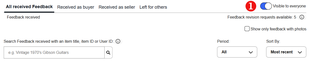
- Go to your feedback profile.
- Scroll down to the All received Feedback section and set the toggle to either Visible to everyone (1) or Off (2).
Leaving feedback for buyers
Leaving feedback is a great way to say thank you to buyers, and it encourages them to leave feedback for you. eBay recommends you leave feedback for your buyers as soon as they’ve paid — they’ll be more likely to leave prompt feedback for you in return.
How to leave feedback for buyers
You can leave feedback for several items at a time or one by one. Here’s how:
- Go to Orders in Seller Hub or Sold in My eBay.
- Choose the item(s), then select Leave feedback.
- Select Positive, enter a comment, then Leave feedback.
A "verified purchase" mark will be displayed next to your feedback to let other eBay members know that your feedback relates to a purchase completed on eBay.
Automatic feedback settings
An easy way to leave feedback for buyers is to use the Automate feedback setting. With Automate feedback, you can “set it and forget it”, allowing you to focus on other aspects of your selling activity.
The Automate feedback setting is available in the All listings and orders section of the Selling preferences page. Here’s how to enable this setting:
- Select Edit next to Automate feedback.
- Select Automatically leave positive feedback.
- Choose one of the two options for when feedback will be left — either after the buyer has paid for the item, or after the buyer has paid for the item and left you positive feedback.
- Select Save.
This feature comes with a number of default positive feedback comments that the system uses randomly when leaving the automated feedback.
To edit the default comments, or add your own, select Edit stored comments. Once you make your changes, make sure to select Save.
Feedback policies
While feedback is intended as an open forum, eBay guidelines and policies listed below are in place to ensure it's used constructively and fairly.
Feedback extortion
Buyers aren't allowed to use threats of negative feedback or low detailed seller ratings to get something that wasn't part of the original listings, and sellers can't demand positive feedback from buyers.
Feedback manipulation
Feedback manipulation, which is any attempt to artificially increase your feedback score or lower another member's, is not allowed.
Members can't exchange feedback solely for the purpose of increasing feedback scores, gaining eBay privileges, or enhancing their reputation on our site. Neither can they influence another member's feedback through a series of repeat purchases, or by leaving negative comments with a positive rating.
Sellers aren't allowed to include terms and conditions in a listing that limit or restrict the buyer from leaving feedback.
❌ Any attempt to manipulate feedback or Detailed Seller Ratings (DSRs) is not allowed.
This includes:
- Offering to buy, sell, trade, or give away feedback
- Registering multiple accounts or working with others to exchange feedback with the purpose of artificially increasing a feedback score
- Referencing eBay feedback in a listing title or description
- Conducting transactions with the purpose of increasing a feedback score, or to obtain Top Rated Seller status or site privileges
- Manipulating another member's feedback through repeat purchases, or a pattern of leaving positive feedback with consistently low DSRs
- Buying or selling eBay user accounts
Activity on eBay is required to follow this policy, the eBay User Agreement and all applicable laws, as well as respect the rights of third parties. If it doesn’t, eBay may take action consistent with applicable laws and the eBay User Agreement, and may even be legally required to do so. Such actions may include, as an example only: Removing the listing or other content, issuing a warning, restricting activity or account suspension.
Feedback misuse
Any misuse of feedback isn't allowed. Feedback content should match the positive or negative rating that was given in both buyer and seller feedback. For example, a negative comment should not be left with a positive rating. Any pictures left in feedback should accurately represent the item purchased and follow our policies, including the Offensive materials policy, the Restricted adult items policy, and the Illegal explicit content policy.
Activity on eBay is required to follow this policy, the eBay User Agreement and all applicable laws, as well as respect the rights of third parties. If it doesn’t, eBay may take action consistent with applicable laws and the eBay User Agreement, and may even be legally required to do so. Such actions may include, as an example only: Removing the listing or other content, issuing a warning, restricting activity or account suspension.
Frequently asked questions
My buyer won't leave me feedback. What should I do?
If you've successfully completed a transaction with another eBay member and they haven't left you feedback, it's fine to send a message as a reminder. Remember though, leaving feedback is completely voluntary.
I received negative feedback that I don't think is fair. What can I do?
You can respond to the feedback and tell your side of the story. As a seller, you can also send a limited number of requests for buyers to revise their feedback.
Can a buyer change feedback they left for someone else?
In most cases eBay members can't change feedback once they submit it. However, if a buyer leaves negative or neutral feedback but wants to change it to positive, the seller can send them a feedback revision request. If the seller is unable to send a feedback revision request, the buyer can leave a clarifying follow up comment to their original feedback.
To sell on eBay, all your feedback information must be public.