




What is IEC (Importer Exporter Code)?
Importer Exporter Code (IEC) is a 10-digit key business Identification number issued by the Director General of Foreign Trade (DGFT) which is mandatory for exports or imports. No export or import shall be made by any person without obtaining an IEC unless specifically exempted.
Benefits of Import Export Code Registration
IEC forms the primary document for recognition by the Government of India as an exporter/importer. On the basis of IEC, businesses can obtain various benefits on their exports/imports from the DGFT, customs, Export Promotion Council, etc.
Access to government schemes and incentives
The Government offers a number of schemes and incentives to businesses that are registered with the DGFT. These schemes can provide financial assistance, tax breaks and other benefits.
Ability to import and export goods
An IEC registration is required for all businesses that want to import or export goods. Without an IEC registration, you will not be able to clear your goods through customs.
Increased credibility
An IEC registration shows that your business is legitimate and that you are compliant with government regulations. This can help you to gain the trust of your customers, suppliers, financial and banking partners.
Ease of doing business
The IEC registration process is relatively simple and straightforward. Once you have registered, you will be able to import and export goods with ease.
Opportunities for growth
An IEC registration can open up new opportunities for your business. You will be able to access new markets and suppliers and you will be able to grow your business into a global enterprise.

Using IEC Code in Export Documents
The IEC code is required to be mentioned in all export documents, including the following:
Bill of lading
The bill of lading is a document that is issued by the shipping company/logistics service provider to the exporter. It is used to track the shipment of goods and to transfer ownership of the goods from the exporter to the importer. The IEC code must be mentioned in the bill of lading in the “Exporter Details” section.
Commercial invoice
The commercial invoice is a document that is issued by the exporter to the importer. It is used to list the goods that are being exported, the quantity, the price and the terms of payment. The IEC code must be mentioned in the commercial invoice in the “Exporter Details” section.
Packing list
The packing list is a document that is issued by the exporter to the importer. It is used to list the contents of the shipment and the quantity of each item. The IEC code must be mentioned in the packing list in the “Exporter Details” section.
Customs declaration
The customs declaration is a document that is submitted by the exporter/importer to the customs authorities when goods are imported or exported. It is used to declare the goods that are being imported or exported, the value of the goods and the purpose of the import or export. The IEC code must be mentioned in the customs declaration in the “Exporter Details” section.

Eligibility Criteria To Apply For Import Export Code (IEC)
IEC may be applied on behalf of a firm which may be a proprietorship, partnership, limited liability partnership, limited company, trust, Hindu undivided family or society. Firm must have a PAN, bank account in the name of the firm and a valid address before applying. Address may be physically verified by the DGFT on issuance of the IEC. Please keep your PAN, bank details and firm details ready before applying.
Who should register for IEC
The following are the types of persons who will mandatorily need an IEC:
- Everyone who wants to import or export goods for business purposes.
- Service provider serving clients abroad. However, for export of services, IEC shall not be necessary except when the service provider is availing of benefits under the Foreign Trade Policy.
Required Documents for IEC:
Set out below are the documents which are necessary to obtain an IEC:
- PAN card of individual or business entity
- Voter Id/ Aadhar card/ Passport of the individual
- Photo of the applicant
- Bank certificate in the prescribed format ANF-2A(I) and a canceled cheque bearing pre-printed name of individual or business entity
- Certification of incorporation and address proof in case of company
- Copy of rent agreement or electricity bill copy of the premise
For more information on the required documents, please visit https://www.dgft.gov.in
Step-by-step guide on how to apply for IEC
Below is systematic process for applying for an IEC:
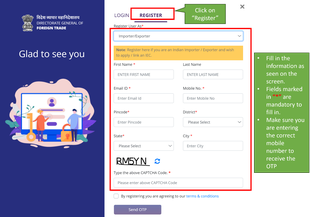
A) First you need to register on the DGFT site by following the below-mentioned steps:
Step 1
Visit the DGFT website and proceed with the registration process

Step 2
Enter the registration details
Step 3
Enter the OTPs received on email and mobile number

Step 4
Upon successful validation of the OTP, you will receive a notification containing the temporary password which you need to change upon first login
B) After you have successfully registered, you can proceed with applying for the Importer Exporter Code (IEC).
01.
Visit the DGFT website and login into the portal with valid credentials.
02.
After login, click on “Apply for IEC” on the Dashboard
03.
Click on “Start Fresh Application” button or click on “Proceed with Existing Application” button in case you have already saved a draft application.
04.
Enter the details in the General Information Section. All mandatory fields have been marked with a red asterisk (*). The draft will only be saved if mandatory details in the “Basic Details” section and “Firm Address Details” section have been added completely.
05.
Enter the details in the “Details of Proprietor / Partner / Director / Karta / Managing / Trustee“ section.
06.
Enter the details in the “Bank Account Details” section
07.
Enter the details in the “Other Details (Exports Sectors preferred)” section. Select the reason and answer the question “Why you are applying for IEC or where this IEC will be utilized”
08.
Read and accept the Declaration. Under the Declaration, accept the terms and conditions by clicking on the check box and enter the place where you are making the application from.
09.
Check the Application Summary and click on “Sign” button to sign the application using a digital token or Aadhaar.
10.
Confirm and proceed to make the payment against the application. For payment, you will be redirected to a payment gateway (Bharatkosh). The application fee is Rs.500. After successful payment, the page will be redirected to the DGFT website and the receipt will be displayed. You can also download the receipt. In case of failure of payment, please wait for an hour to reflect the payment from the payment gateway.